Part of the Copilot Chat for Real Work Series
If you’re an office manager, you’re often the person keeping everything together.
Schedules.
Projects.
Vendors.
Policies.
Employee questions.
Equipment issues.
The office birthday cake nobody remembered until the last minute.
Some days it feels less like managing an office and more like directing traffic during rush hour.
The good news? Copilot Chat can help reduce some of that chaos.
You don’t need to be a technical expert or learn complicated AI prompts. In many cases, simply describing what you need in plain English is enough to save time and eliminate repetitive work.
In This Article
- What Is Copilot Chat?
- Quick Win #1: Draft Company-Wide Communications
- Quick Win #2: Build Better Office Checklists
- Quick Win #3: Organize Multiple Projects
- Quick Win #4: Create Policies Faster
- Quick Win #5: Prepare for Vendor and Team Meetings
- Bonus: Remote & Hybrid Office Management
- The Biggest Mistake Office Managers Make
- One Challenge for This Week
- Final Thoughts
What Is Copilot Chat?
Copilot Chat is Microsoft’s AI assistant designed to help you:
- Draft content
- Summarize information
- Organize ideas
- Create procedures
- Build checklists
- Brainstorm solutions
- Improve communication
Think of it as an extra set of hands when your to-do list keeps growing faster than you can cross things off.
Quick Win #1: Draft Company-Wide Communications
Office managers send a lot of announcements:
- Building maintenance
- Internet outages
- Office closures
- Parking changes
- Policy updates
- Event reminders
Prompt
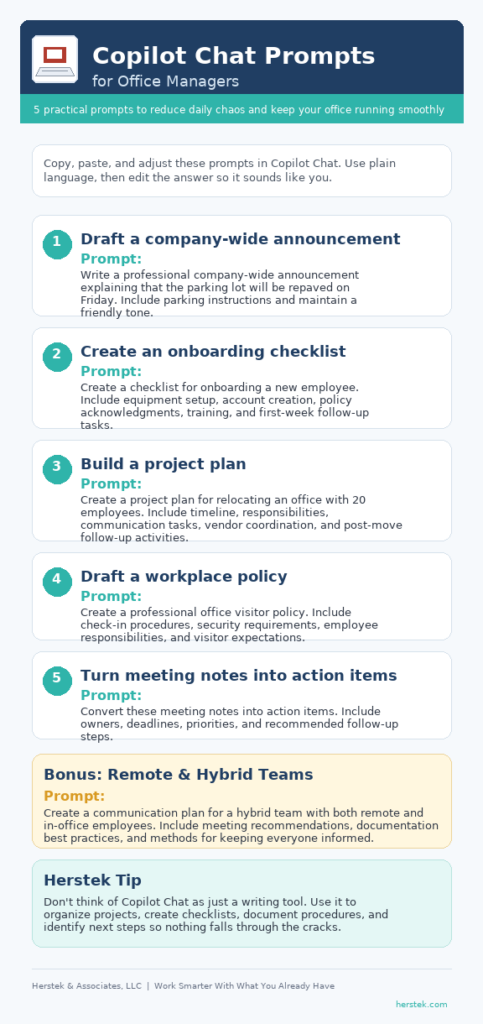
Write a professional company-wide announcement explaining that the parking lot will be repaved on Friday. Include parking instructions and maintain a friendly tone.
Herstek Tip
Use Copilot Chat for the first draft, not the final draft. Your knowledge of the company culture is still important.
Quick Win #2: Build Better Office Checklists
Office managers often oversee recurring activities such as:
- New employee onboarding
- Opening and closing procedures
- Monthly supply ordering
- Vendor reviews
- Safety inspections
Prompt
Create a checklist for onboarding a new employee. Include equipment setup, account creation, policy acknowledgments, training, and first-week follow-up tasks.
Many office managers discover missing steps they didn’t realize were living only in their heads.
Quick Win #3: Organize Multiple Projects
Most office managers juggle several projects at once.
Maybe you’re planning:
- An office move
- A software rollout
- A company event
- New employee onboarding
- Annual compliance reviews
Prompt
Create a project plan for relocating an office with 20 employees. Include timeline, responsibilities, communication tasks, vendor coordination, and post-move follow-up activities.
Quick Win #4: Create Policies Faster
Let’s be honest.
Most people don’t enjoy writing policies.
Prompt
Create a professional office visitor policy. Include check-in procedures, security requirements, employee responsibilities, and visitor expectations.
You’ll still need to review the content for accuracy, but Copilot Chat can save significant time organizing information into a professional format.
Quick Win #5: Prepare for Vendor and Team Meetings
Prompt
Create a 45-minute meeting agenda for reviewing office operations, vendor performance, facility concerns, and upcoming projects.
After the meeting, try:
Prompt
Convert these meeting notes into action items. Include owners, deadlines, priorities, and recommended follow-up steps.
This helps ensure important tasks don’t disappear into somebody’s notebook.
Bonus: Remote & Hybrid Office Management
Managing an office is challenging.
Managing an office when half the employees aren’t physically there can be even harder.
Remote and hybrid teams often struggle with:
- Communication gaps
- Unclear responsibilities
- Missed follow-ups
- Meeting overload
- Documentation that lives in someone’s inbox
Copilot Chat can help bring structure to the chaos.
Prompt
Create a communication plan for a hybrid team with both remote and in-office employees. Include meeting recommendations, documentation best practices, and methods for keeping everyone informed.
Prompt
Review these meeting notes and identify decisions that need to be documented and communicated to remote employees.
Prompt
Create a weekly manager update summarizing the following project updates, employee issues, completed work, and upcoming priorities.
For many office managers, the challenge isn’t collecting information.
It’s organizing information so everyone receives the same message.
That’s where Copilot Chat can be surprisingly helpful.
Herstek Tip
If team members keep asking the same questions, that’s often a sign the process isn’t documented clearly enough. Try asking Copilot Chat to turn recurring questions into an FAQ, checklist, or procedure.
Future-you will be grateful.
The Biggest Mistake Office Managers Make
Many people think AI only helps with writing.
It doesn’t.
Some of the biggest benefits come from:
- Organizing information
- Structuring projects
- Creating procedures
- Building checklists
- Identifying next steps
Think beyond content creation.
Think operational efficiency.
One Challenge for This Week
Choose one recurring responsibility you manage.
Maybe it’s:
- Employee onboarding
- Supply ordering
- Meeting preparation
- Vendor management
- Policy documentation
Use Copilot Chat to help with that task one time this week.
Not to replace your work.
Just to remove some of the repetitive parts.
If it saves you even 15 minutes, that’s 15 minutes you can spend on the things only you can do.
Final Thoughts
One thing I’ve learned over the years is that office managers rarely get credit for all the problems they prevent.
When everything runs smoothly, nobody notices.
When something breaks, everybody notices.
Copilot Chat won’t stop the unexpected interruptions, vendor issues, employee questions, or last-minute requests that show up every day.
But it can help you spend less time creating first drafts, formatting documents, organizing notes, and building processes from scratch.
And for busy office managers, that’s often enough to make the entire day feel a little more manageable.