
Part of the Copilot Chat for Real Work Series
Most accountants didn’t enter the profession because they love chasing paperwork, digging through email chains, or retyping information into reports.
Yet many accounting professionals spend hours every week doing exactly that.
Between client requests, month-end close activities, tax preparation, billing questions, document collection, and internal reporting, administrative tasks can quickly consume the day.
If you’re already using Microsoft 365, Copilot Chat can help reduce some of that workload and free up more time for the work that actually requires your expertise.
Here are five practical ways accountants, CPAs, controllers, and accounting firm leaders can start using Copilot Chat today.
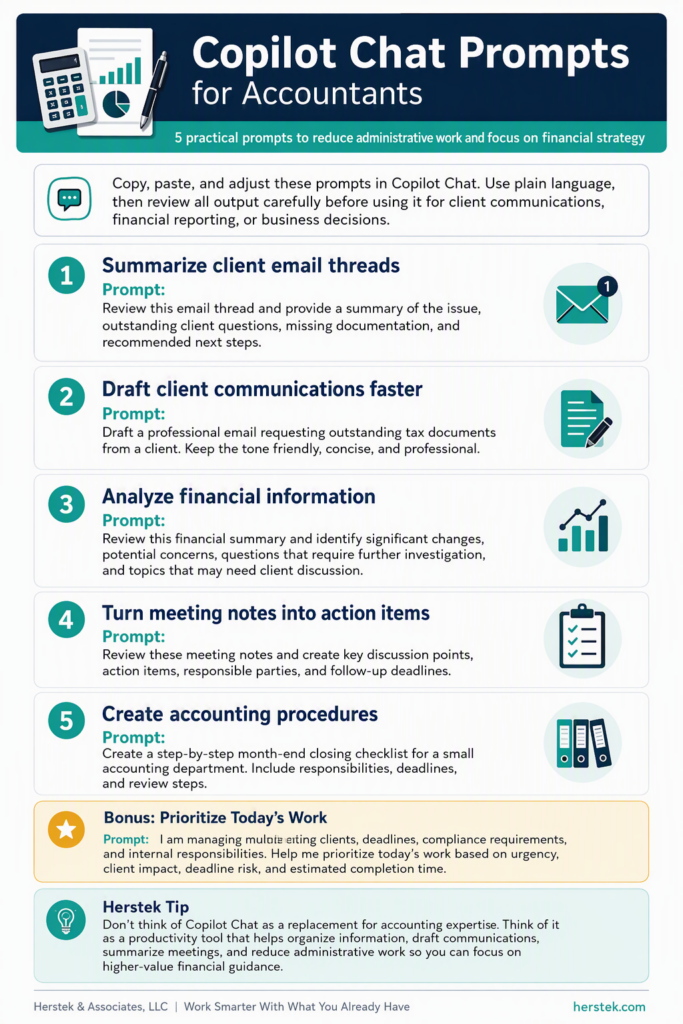
1. Turn Messy Email Threads Into Actionable Summaries
Accounting questions rarely arrive neatly packaged.
Instead, they often appear across multiple emails, forwarded messages, and reply-all conversations.
Rather than spending time piecing everything together, try:
Prompt
Review this email thread and provide:
• A summary of the issue
• Outstanding client questions
• Missing documentation needed
• Recommended next steps
Why It Helps
Instead of reading 15 emails to determine what’s happening, you get a concise summary and a clear action plan.
✅ Less email digging
✅ Faster response times
✅ Improved client service
2. Create Professional Client Communications Faster
Many accounting professionals spend more time writing emails than they realize.
Copilot Chat can help draft messages for:
- Missing documents
- Tax return updates
- Billing questions
- Audit requests
- Deadline reminders
- Follow-up communications
Prompt
Draft a professional email requesting outstanding tax documents from a client. Keep the tone friendly, concise, and professional.
Why It Helps
You still review and personalize the message, but the first draft is done in seconds.
✅ Reduced administrative work
✅ More consistent communication
✅ Less time staring at a blank screen
3. Quickly Analyze Financial Information Before Meetings
Whether you’re preparing for a client meeting, board presentation, management review, or month-end discussion, reviewing financial information takes time.
Copilot Chat can help identify trends and areas that deserve attention before the meeting begins.
Prompt
Review this financial summary and identify:
• Significant changes from prior periods
• Potential problem areas
• Questions I should investigate further
• Items that may require client discussion
Why It Helps
Before client reviews, management meetings, or strategic planning sessions, Copilot can help you prepare faster and focus your attention where it matters most.
✅ Faster preparation
✅ Better client conversations
✅ More strategic insights
4. Prepare Meeting Notes and Follow-Up Tasks
Whether you’re discussing tax strategies, audits, payroll concerns, client onboarding, or financial reporting, meetings often generate a long list of action items.
Paste meeting notes into Copilot Chat and ask:
Prompt
Review these meeting notes and create:
• Key discussion points
• Action items
• Responsible parties
• Follow-up deadlines
Why It Helps
No more digging through pages of notes trying to remember what was discussed and who was responsible for each task.
✅ Improved accountability
✅ Better organization
✅ Faster follow-up
5. Build Standard Operating Procedures for Your Accounting Team
Many accounting firms and finance departments struggle with documenting responsibilities and maintaining consistency across the team.
Copilot Chat can help create first drafts for:
- Month-end close procedures
- Accounts payable workflows
- Accounts receivable processes
- Client onboarding procedures
- Audit preparation checklists
- Employee training documentation
Prompt
Create a step-by-step month-end closing checklist for a small accounting department. Include responsibilities, deadlines, and review steps.
Why It Helps
Documentation becomes much easier when you start with a draft instead of a blank page.
✅ Easier employee training
✅ More consistent processes
✅ Reduced knowledge gaps when team members are unavailable
Bonus Prompt: The Daily Accountant Productivity Assistant
Many accountants balance competing priorities every day—client requests, deadlines, compliance requirements, internal projects, and unexpected interruptions.
Try starting your morning with this prompt:
I am managing multiple accounting clients, deadlines, compliance requirements, and internal responsibilities. Help me prioritize today’s work. Organize tasks by urgency, client impact, deadline risk, and estimated completion time. Identify any items that should be delegated or handled first.
You’ll often find that simply organizing the workload is half the battle.
Final Thoughts
The best use of AI in accounting isn’t replacing accountants.
It’s reducing the administrative work that gets in the way of accounting.
Copilot Chat can help summarize information, draft communications, organize tasks, and streamline routine work so accounting professionals can spend more time serving clients, analyzing financial data, and providing strategic guidance.
Because the real value accountants deliver isn’t found in email inboxes, meeting notes, or repetitive documentation.
It’s found in the expertise, insight, and advice that help businesses make smarter financial decisions.
And that’s where your time should be spent.